PIXTAME · PRACTICAL GUIDE
How to Reduce Colors in a Fuse Bead Pattern Without Losing Detail
Fewer colors can make a bead project easier to prepare, but a small color count is not the only goal. Preserve the outline, important highlights, and recognizable details first. Start with a clean pixel grid so background noise is not mistaken for useful color.
Step by step
Align the grid before merging colors
Start in pixel art mode if the source is blurry. Check the row and column count and align the sampling points before adjusting similar-color tolerance. A misplaced sample may create an extra shade at every edge.
Clear only the background you do not need
Preview background selection before applying it. Transparent empty cells do not require beads; white pixels are still a color. Use undo or recovery if part of the cake, highlight, or outline is removed.
Inspect rare colors instead of deleting them
Click a color in the summary to find its cells. A color used once may be a deliberate highlight. Inspect the cake frosting, tiny decorations, and outline before deciding which shades to merge. Low quantity alone does not mean noise.
Increase similar-color tolerance gradually
Start with merging off, change tolerance in small steps, and compare at the same zoom. Watch the outline, frosting highlights, and small decorations. The tolerance is a similarity threshold, not a target number of colors. No single setting suits every image.
Review the mapped pattern and export
Choose the brand palette that matches your supplies and check the mapped-color preview. Count distinct mapped codes separately from source RGB colors: they are different measurements. Export the chart only after checking the final quantities, and save a .pixtame project before trying a more aggressive merge.
Practice: from cake pixels to a printable pattern
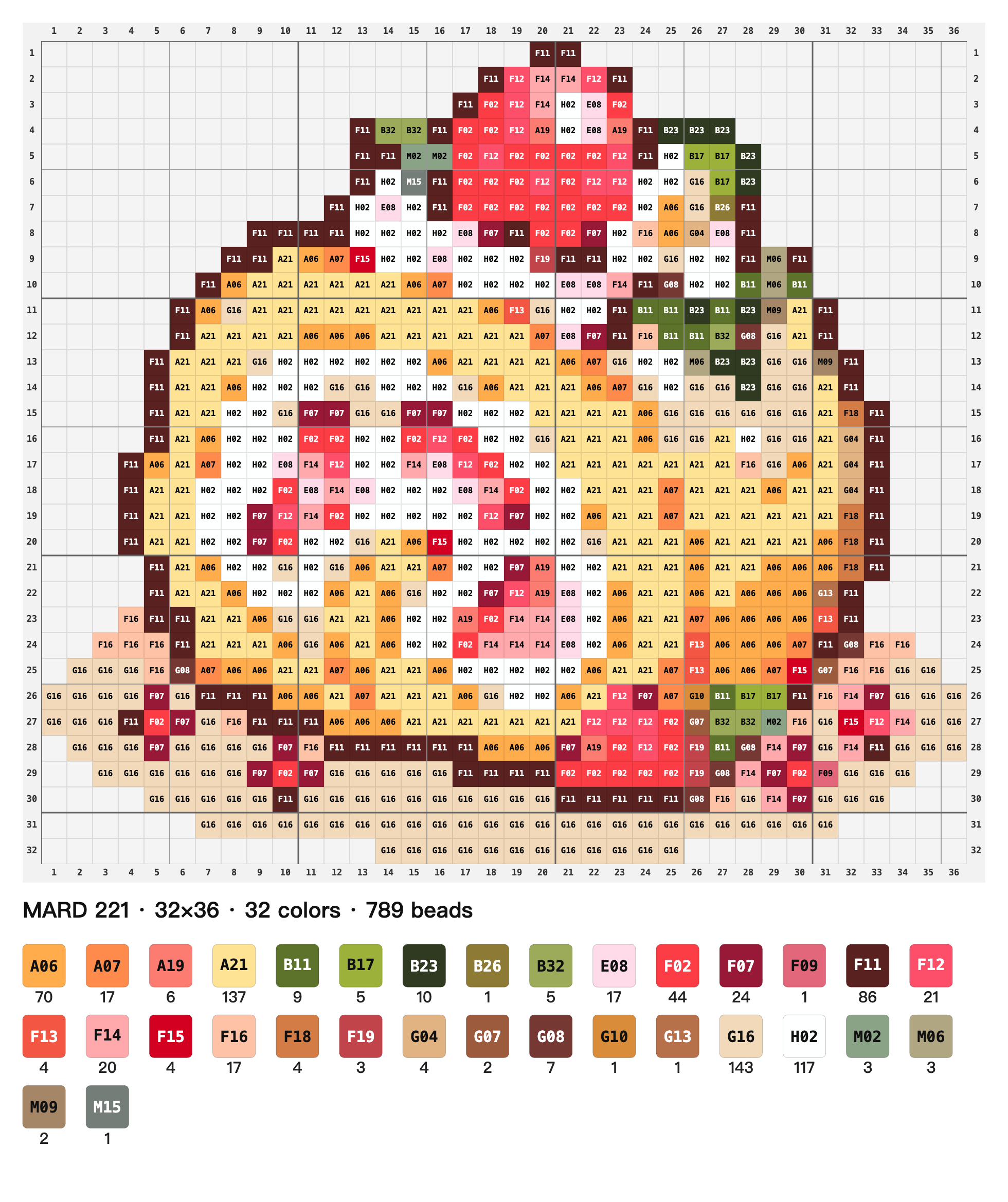
The pattern below was exported from the current editor using the previous guide’s recovered cake image, similar-color tolerance 12, and the MARD 221 palette (32 colors, 789 beads). It demonstrates the pattern layout and estimated counts; it has not been verified by assembling physical beads.

Questions and limitations
How many colors should I keep?
Keep enough colors for the important features to remain readable. The worked cake chart has 32 mapped colors at tolerance 12 with MARD 221. This is one example, not a recommended target for every image.
Will reducing colors reduce the number of beads?
Not by itself. If the occupied cells stay the same, replacing several colors with one does not reduce the total number of beads. Clearing a background or changing the grid can change the total.
What can I download for this example?
Download the recovered cake input above and open the actual MARD 221 pattern image. The previous worked example recorded 32 colors and 789 beads; changing the palette, grid, or cleanup settings can change those totals.
Try the steps with your own image.
Open PixTame →